Rhythm-game history / Historical analysis
Rock Band: different instruments, one performance
Rock Band puts guitar, drums, vocals and other parts into a shared performance. Each player follows a different task and set of cues while the song advances for everyone, giving ensemble play a structure distinct from solo performance.
Article summary
- Each role uses different controllers and screen information.
- Multiple parts move within the same song progression.
- Cooperation connects instrument-specific tasks to shared progression.
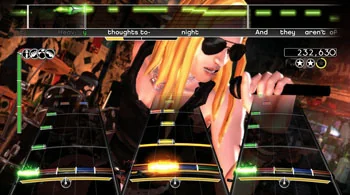
Rock Band · 2007 game screenshot
Vocal indicators above and instrument lanes below share one performance screen. Participants progress through the same song while reading different signals and using different controllers.
Image credit: game by Harmonix / MTV Games / Electronic Arts · Image archive: Wikipedia · Source page ↗ · Original image ↗


Basic controls
- Read your instrument's lanes or vocal display.
- Use the controller for your role: guitar, bass, drums or microphone.
- Results from different parts contribute to the same song's progression.
Individual parts played through different controllers
Guitar controllers, drum pads and microphones require different actions. Drums combine hand strikes with a foot pedal, dividing movement across the body. Explain what each part asks of the player alongside the hardware it uses.
The 2007 band configuration
A Harmonix developer's retrospective describes the move from Guitar Hero to Rock Band as an expansion from solo guitar to a band. Its recorded year, 2007, supplies this article's date reference.
Controls and features at a glance
| Element | What the player does | Play characteristic |
|---|---|---|
| Guitar and bass | Play a part through a string-instrument-shaped controller | Charts for each role |
| Drums | Strike pads and operate the pedal | Division between hands and foot |
| Vocals | Join the song through a microphone | A different input method joins the performance |
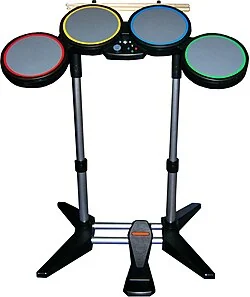
Rock Band · Drum-controller photo
A drum-shaped controller with four pads and a foot pedal, combining hand strikes with foot movement.
Image credit: photograph provided through Wikimedia Commons · See the individual file's rights statement · Source page ↗ · Original image ↗

Individual difficulty and shared progression
Individual parts can have different difficulties while sharing the song's progress. Where the screen shows personal performance and collective results may shape cooperation. Each player needs information about their own part and the ensemble's progress.
Turns and the other player's input
Even a simple two-player game with alternating presses needs to mark whose turn it is. If one person's input cues the other's next action, the rules may create cooperative decisions. Dividing the screen and giving players a reason to work together are separate design tasks.
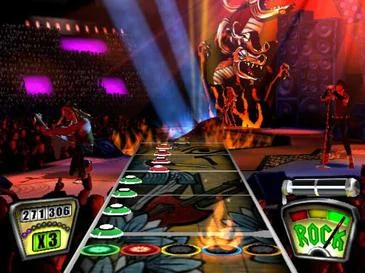
Guitar Hero · 2005 game screenshot
Five colored fret indicators sit on lanes shaped like a guitar neck. Foreground notes convey actions; the background stage and performers establish the concert setting.
Image credit: game by RedOctane / Harmonix · Image archive: Wikipedia · Source page ↗ · Original image ↗


Communicating causes of failure
Showing who missed which input conveys information; the wording used also shapes how that information is received. Ask whether the same scoring system adequately explains solo and ensemble play. Distinguishing individual tasks from shared goals makes the cooperative structure precise.
Sources & scope
A creator retrospective informs this analysis of guitar, drum and vocal roles and their shared progression.