Rhythm-game history / Historical analysis
osu!: play, chart creation and the records of 2007
osu!'s 2007 records place gameplay alongside an editor. The route into choosing and playing a song connects to creating and testing charts, making production and sharing part of its content structure.
Article summary
- Read circle positions and timing cues together.
- Chart creation, testing and sharing connect to the content experience.
- Distinguish early test dates from public release and ranking introductions.
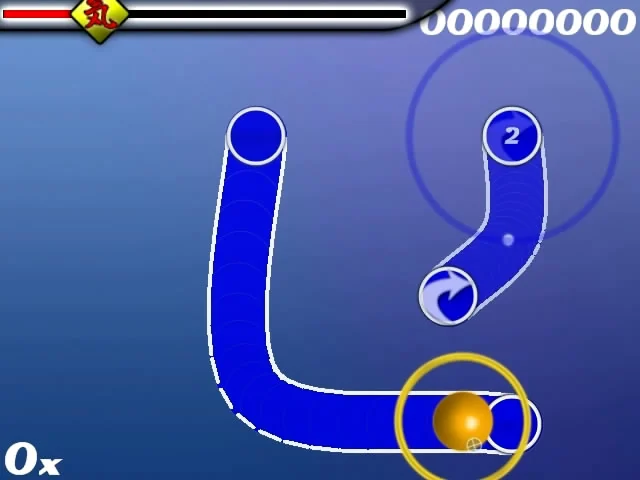
osu! · Early 2007 screenshot preserved in the official wiki
An early osu! screen with hit circles and curved sliders, preserved in the official wiki's record of the game's developing editor and player community.
Image credit: ppy / osu! wiki · Source page ↗ · Original image ↗
Basic controls
- Move the cursor to a circular note.
- Click or press a key when the approach circle aligns.
- Hold input while following a slider's path.
Input combining position and timing
Moving a cursor to a target and acting on its timing cue combines distance, route and timing in one task. Early prototype screens already show that relationship between where to move and when to act.
Several stages of testing and public release
The official history describes small tests, the September public release and forum, and October ranking and beatmap-database introductions as separate events. It also records an editor from early development. This article organizes them as several stages within 2007.
Controls and features at a glance
| Element | What the player does | Play characteristic |
|---|---|---|
| Position | Move the cursor toward an on-screen target | Travel distance and route |
| Timing | Act on the target's timing cue | Combine music and action |
| Creation | Make, test and share charts | A cycle of playable content |
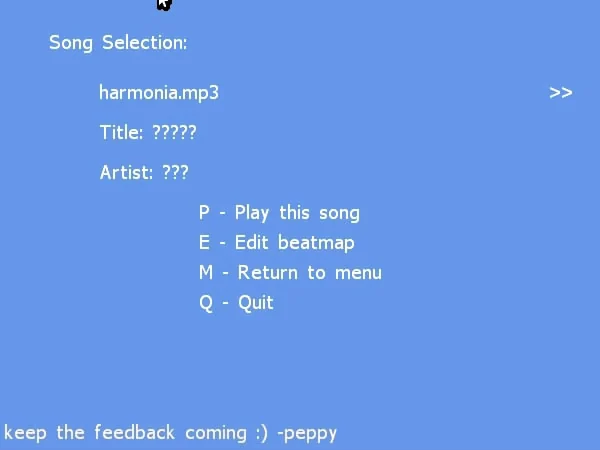
osu! · Early 2007 song-selection screen
An early selection screen with Play and Edit, offering entry points to both gameplay and chart creation.
Image credit: official osu! development-history archive · Source page ↗ · Original image ↗
Play and Edit coexist
The early song-selection screen offers Play and Edit beside each other. Gameplay and chart creation have separate entry points, but creation, testing and sharing feed the content available to choose.
Keep authoring data and gameplay in sync
An edited target time reaches play only if display and scoring read the same data. A team can build an internal authoring, testing and revision process independently of releasing an editor to the public. Tool usability and the quality of its output each need evaluation.
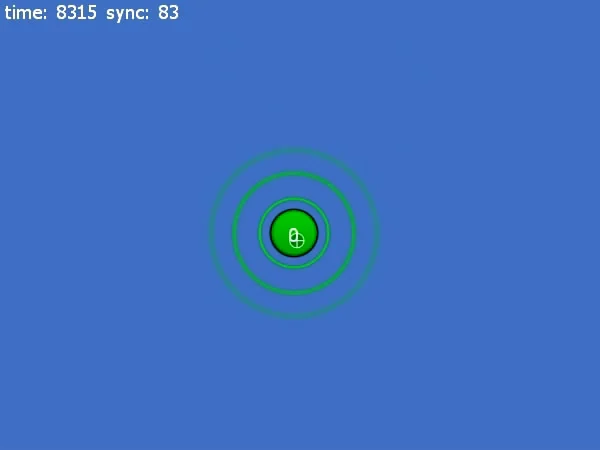
osu! · Early 2007 prototype
An early prototype screen with simple circles and background. It documents initial input cues and experimental arrangements in development history.
Image credit: official osu! development-history archive · Source page ↗ · Original image ↗
Information distinguishing multiple charts
Charts of one song need identifiers for version, difficulty, matching recording, author and usage conditions. Sharing a chart and redistributing the original music involve separate rights. Data management therefore affects which content players can find and use.
Sources & scope
Tests, public release and ranking introductions are presented as recorded in the official development history. Use of recordings and charts follows their respective rights holders and distributors.