Rhythm-game history / Historical analysis
pop’n music: nine buttons, songs and characters
pop'n music brings nine round buttons, songs and characters into an arcade rhythm game. A song's presentation helps shape the choice before play; its patterns give the hands a layout to learn once the performance starts.
Article summary
- Connect differently colored and positioned buttons to screen lanes.
- Characters support a song's atmosphere and help players remember selections.
- Examine beginner guidance separately from the nine-button task.
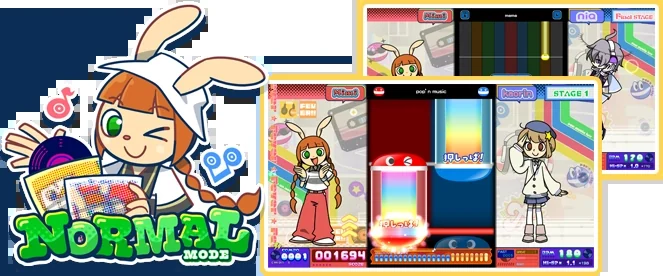
pop'n music High☆Cheers!! · NORMAL mode guide
An official guide from a later pop'n music release. Vertical lanes, a lower judgment line and characters at both sides accompany explanations of five- and nine-button configurations.
Image credit: KONAMI / e-amusement · Source page ↗ · Original image ↗
Basic controls
- Use color and position to identify the lanes of descending Pop-kun notes.
- Press the corresponding button at the judgment line.
- Changing button count changes both the hands' coverage and screen density.
Mapping button position and color
Screen lanes correspond to round buttons of different sizes and colors. Their spacing and simultaneous presses create demands on hand movement. Friendly characters set the tone, while the patterns provide a separate task to learn.
A series continuing from 1998
KONAMI's chronology records pop'n music in 1998. Later official announcements describe varied music, characters and nine buttons as series features. The starting date is distinguished from current-version song lists and modes.
Controls and features at a glance
| Element | What the player does | Play characteristic |
|---|---|---|
| Buttons | Press round buttons in different positions and colors | Simultaneous input and hand movement |
| Characters | Figures and expression associated with songs | Leave a memorable impression of a selection |
| Mode | The current version also provides beginner guidance | Separate learning order from the underlying controls |
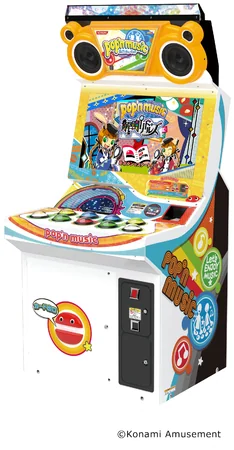
pop'n music · Official arcade-cabinet photo
A cabinet with nine large round buttons, showing correspondence between lanes and physical hand positions.
Image credit: KONAMI · Source page ↗ · Original image ↗
Characters that help a song stay memorable
Characters give songs an atmosphere and a visual cue to remember them by. That impression accompanies the difficulty selection. Learning the button positions and patterns happens during play.
Song selection and gameplay screens
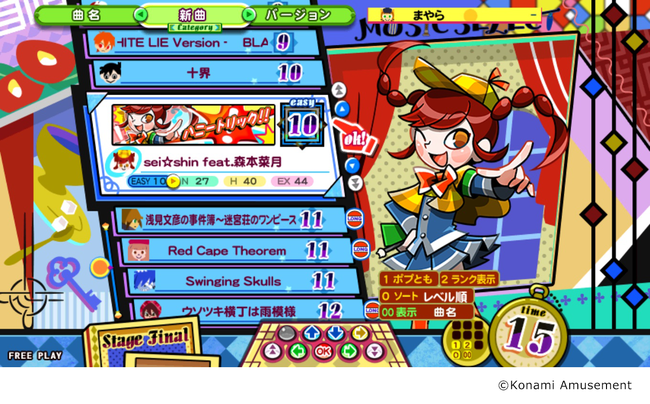
Song selection presents the track, character and difficulty together. Gameplay tells players where and when to press. The design can carry a song's personality between those screens while keeping input cues clear; character expressions and reactions add to the scored feedback.
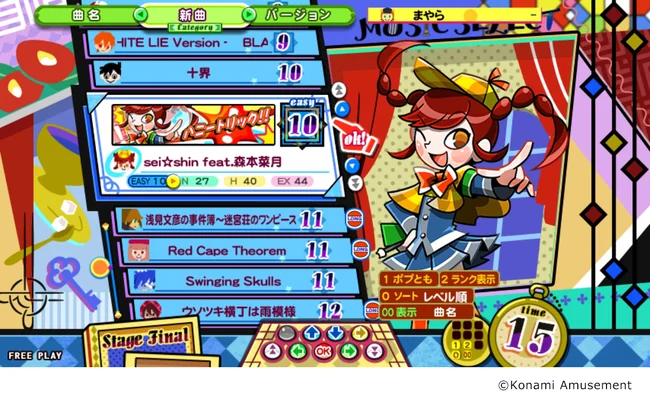
pop'n music Kaimei Riddles · Song-selection screen
A selection screen presenting songs, characters and difficulty together. It is the preparation stage for choosing a song and configuration.
Image credit: KONAMI · Source page ↗ · Original image ↗
Welcoming newcomers and supporting mastery
Look at the current version's beginner guidance separately from its underlying controls to understand the learning sequence. Song-selection appeal and rule comprehension answer different questions about starting play. Assess character presentation and control clarity on their own terms.
Sources & scope
The starting year follows the official chronology. Later-product photographs and mode guides explain button configurations and song selection.