Research and analysis / Reading technical literature
Scheduling web audio with two clocks
A timer callback running and a sound playing are different events. This guide uses a technical article's 25 ms check interval and 100 ms lookahead to build a timeline showing which delays advance scheduling can cover and what happens when it falls behind.
Article summary
- Check at short intervals and schedule future audio events.
- Also calculate cases where callback delay exceeds the lookahead.
- Design complete-song playback separately from an event sequencer.
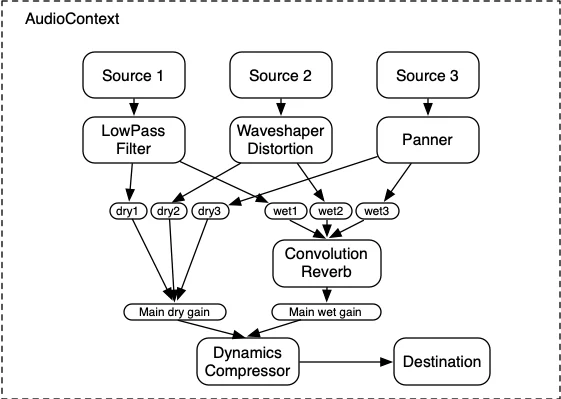
Web Audio API 1.1 · 2026-09-22 Working Draft
Audio sources flow through processing nodes to an output. The original timeline below explains callback and scheduling times.
Image credit: W3C Web Audio Working Group · W3C Document License · Source page ↗ · Original image ↗ · Document license ↗

Separate timer callbacks from scheduled sound
If each timer callback plays a sound immediately, callback delays become audible timing delays. Chris Wilson's technical guide describes a scheduler that wakes frequently and books upcoming events on the audio clock. We use it here as a technical explanation.
The scheduler finds upcoming events and assigns their audio start times. Screen updates and inputs use the same musical reference for their own tasks.
Related primary sources: Chris Wilson · A tale of two clocks ↗
Read the 25 ms check interval separately from the 100 ms horizon
The original article and MDN example check every 25 ms and schedule 100 ms ahead. The interval controls when the scheduler checks again; the horizon controls how far ahead it books audio now. Treat them as starting examples, then test under the expected load and need for real-time changes.
In the original timeline, the first check at 0 ms schedules [0,100). Even if the next check slips from its planned 25 ms to 55 ms, the 80 ms event is already scheduled. At 55 ms, the scheduler can book the unprocessed 120 ms event within [55,155).
Related primary sources: Chris Wilson · A tale of two clocks ↗ · MDN · Creating and sequencing audio ↗
Give the numbers their separate roles
| Value | Role | Original example |
|---|---|---|
| 25ms | Requested check interval | Actual arrival may be at 55 ms |
| 100ms | Future horizon scheduled at one check | Initial range [0,100) |
| 80ms | Audio event target time | Scheduled at the first check |
| 120ms | Next event's target time | Needs a subsequent check in time |
DJMAX RESPECT V · Official PC screenshot
A game screen showing notes, a hit line and their layout. Measuring scheduling accuracy and delays requires execution records.
Image credit: NEOWIZ / Steam · Source page ↗ · Original image ↗
What lookahead covers when a callback runs late
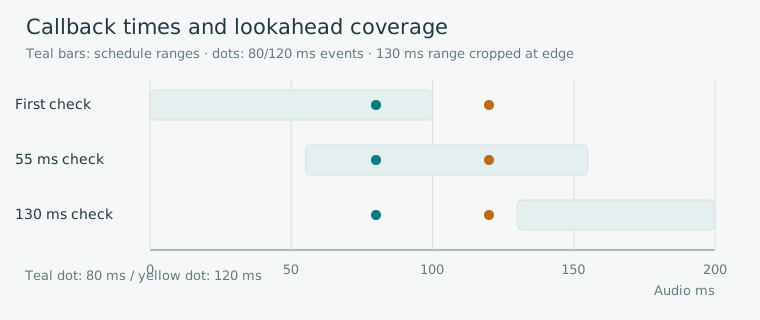
Editorial diagram · An original example with the first check at 0 ms and the next at 55 or 130 ms.
Horizontal axis: elapsed audio time, 0–200 ms. Bars=scheduling ranges; circles=events; triangles=actual checks.
On smaller screens, scroll the diagram horizontally. Enlarge diagram ↗
Values and sequence shown in the diagram
- Initial [0,100): 80 ms event scheduled
- Check at 55 ms: schedule 120 ms event within [55,155)
- Check at 130 ms: the 120 ms target has passed; a late-event policy is needed
Calculate delays beyond the scheduling horizon too
If the next check arrives at 130 ms, the 120 ms event has already passed its target because it lay beyond the first scheduling horizon. The 80 ms event was booked earlier and remains covered. The later event now needs a defined late-event policy.
Whether to play a late event immediately, skip it or move it to the next beat is a product rule. Retain the audio target, actual scheduling time and evidence about the delay to validate boundary conditions.
Separate complete-song playback from an event sequencer
A fixed song can play as one source; its recorded drums are already in the file. Derive note positions, scored results and visuals from the song's start reference and file position. A sequencer that generates individual instrument events instead needs ongoing advance scheduling.
Both approaches need references for stops, resumes and playback-rate changes. A longer horizon also means handling more already-booked events when conditions change. Define how scheduled sources and events are cleared.
Related primary sources: Chris Wilson · A tale of two clocks ↗
Roles in song playback and event sequencing
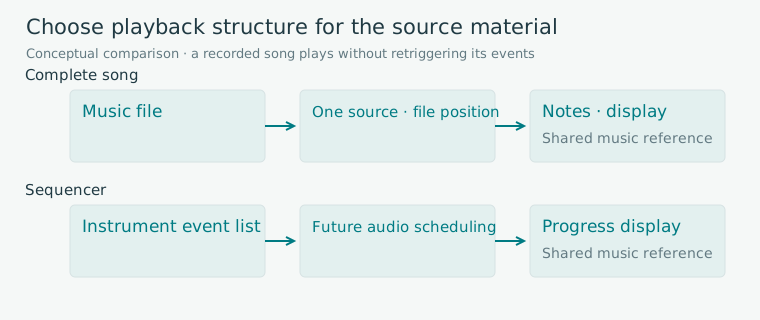
Editorial diagram · A conceptual comparison of playing a fixed song and individual instrument events.
Columns: input material → playback structure → display reading the musical reference.
On smaller screens, scroll the diagram horizontally. Enlarge diagram ↗
Values and sequence shown in the diagram
- Song: file source → file position → notes and display
- Sequencer: event list → future audio scheduling → progress display
Render the screen from the same reference
The scheduler books sounds. The display calculates active targets and progress from current music position, using requestAnimationFrame to update the screen. Routing describes where audio flows; the timeline describes when its events are scheduled.
DJMAX's screenshot shows notes, a hit line and results. To examine precise scheduling, use code and execution logs. Record frame intervals, input events and the audio reference together to locate the source of a timing change.
Related primary sources: MDN · Creating and sequencing audio ↗
Test interruption, return and delays separately
Start by checking a small event table for normal callbacks, a 55 ms delay and a 130 ms delay. Then inspect saved position at interruption, cleanup of scheduled sources, the new origin and prevention of duplicate scheduling. Check whether repeated Resume inputs still produce one playback.
After checking the model, test sound and input on supported devices. Use callback-delay records and responsiveness to changes to justify the chosen values. The 25 and 100 ms examples need evaluation in that environment.
Conditions to check on a small timeline
| Condition | 80 ms event | 120 ms event |
|---|---|---|
| Check at 0 ms, then 55 ms | Already scheduled | Scheduled ahead at 55 ms |
| Check at 0 ms, then 130 ms | Already scheduled | Apply late-event policy |
| Resume after interruption | Clean up previous source | Schedule from the new reference without duplication |
Sources & scope
Sources reviewed 2026.10.17: Scheduling ahead and the original 25/100 ms example, plus MDN's Playing the audio in time section. The 80/120 ms events and 55/130 ms delays are original explanatory calculations, separate from physical-device performance measurements.