Audio technology / Technical analysis
Note timing and audio latency: two different problems
A note reaching the hit line, a position in the music file and a sample reaching the output device describe different events. Separating them makes synchronization easier to investigate. Using hypothetical values for three clocks, this guide works through playback, stopping, resuming and looping, then explains what output timestamps can tell us.
Article summary
- Record units, origins and what is being measured, then convert to a shared basis.
- Calculate file position from playback rate and the current segment's reference points.
- Distinguish output-frame correspondence, repeated taps and physical latency measurements.
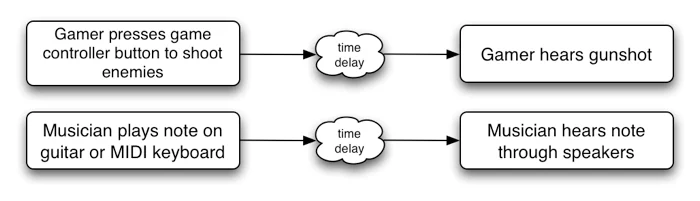
Web Audio API 1.1 · Latency illustration
This official diagram explains the delay from operating a button or instrument to hearing sound. The article then distinguishes program time coordinates from file position.
Image credit: W3C Web Audio Working Group · W3C Document License · Source page ↗ · Original image ↗ · Document license ↗

Different numbers can describe the same instant
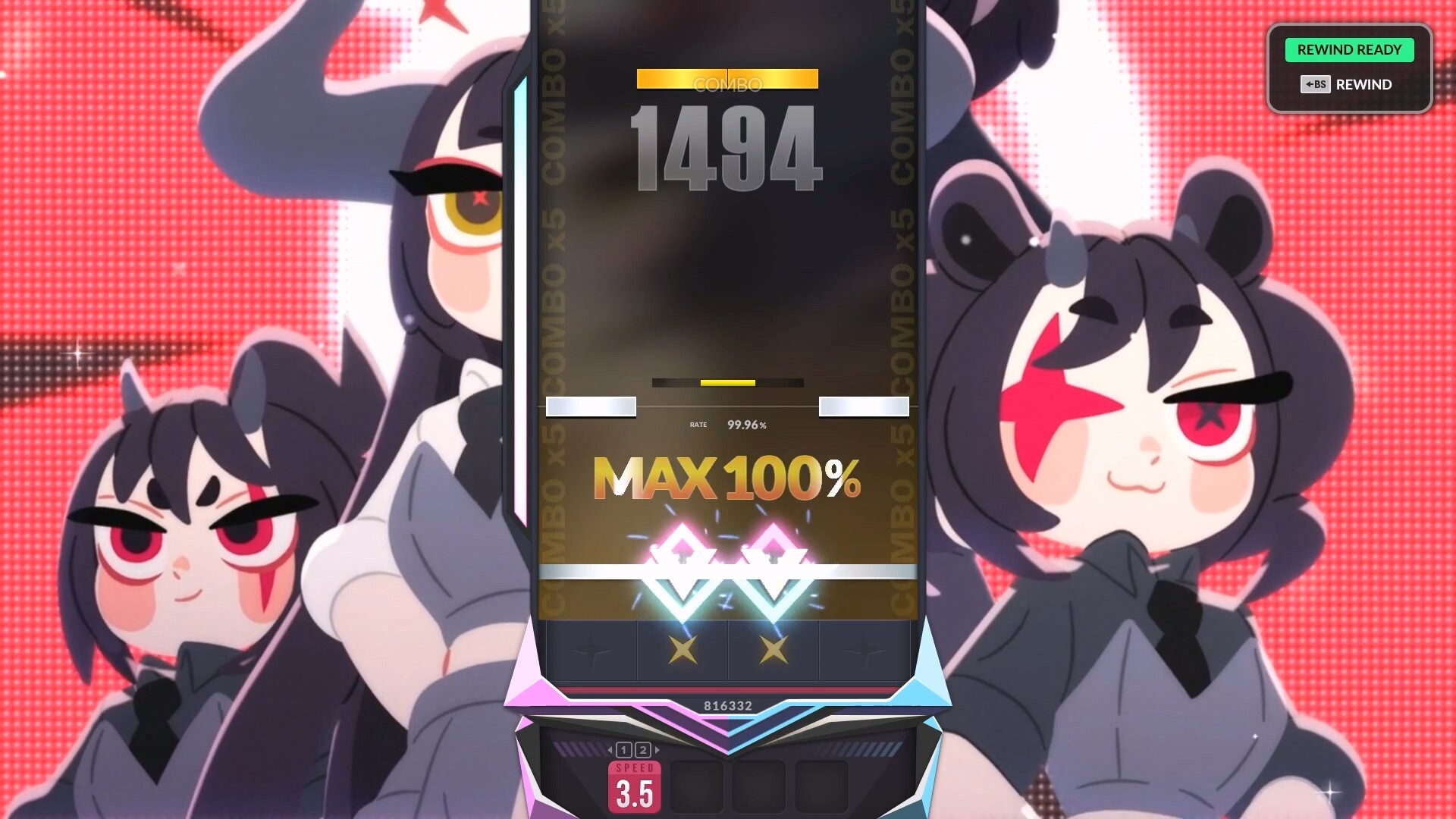
When a note appears to overlap the hit line, start by identifying the value being recorded. Screen coordinates, program timestamps, music-file position and output-stream position describe different things. The DJMAX screenshot shows where to look on screen; establishing when sound is heard takes a separate measurement.
In a hypothetical example, the same instant is performance time 12,500 ms, audio-context time 8.2 seconds and music-file position 14 seconds. The numbers differ because each clock has its own units and origin. Record those definitions before converting values to a shared timeline.
Related primary sources: W3C · High Resolution Time time origin ↗
One instant, three time coordinates
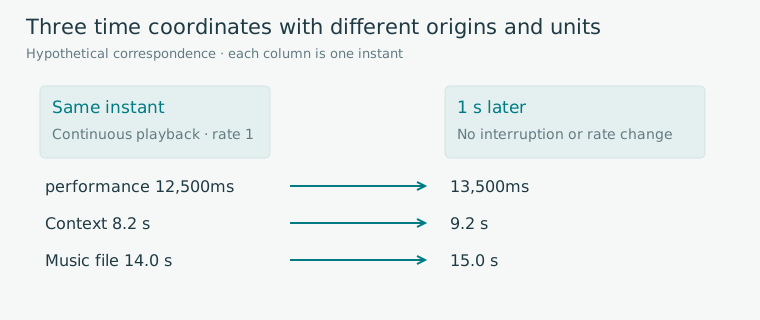
Editorial diagram · A hypothetical correspondence table linking performance time 12,500 ms, context time 8.2 seconds and file position 14 seconds.
Horizontal: the same instant and 1 second later. Rows: performance (ms), context (seconds) and file (seconds).
On smaller screens, scroll the diagram horizontally. Enlarge diagram ↗
Values and sequence shown in the diagram
- 12,500 ms ↔ 8.2 s ↔ 14.0 s
- 13,500 ms ↔ 9.2 s ↔ 15.0 s, assuming uninterrupted playback at rate 1
Connect the file offset to elapsed playback time
In a separate calculation, let the scheduled audio start be E=8 seconds, current context time C=10 seconds and starting file offset O=14 seconds. With uninterrupted playback at rate 1, file position is O+(C−E)=16 seconds. C−E is elapsed context time, while O is the starting position in the file.
At a constant playback rate r, the expression becomes O+r(C−E). Treat time before the scheduled start as waiting, and record E, O and r for every segment. Keep this file-position calculation separate from the mapping between program time and audio-device output timestamps.
Position calculation for uninterrupted playback at rate 1
| Item | Value | Role |
|---|---|---|
| E | 8 s | Scheduled audio start time |
| C | 10 s | Current audio time |
| O | 14 s | Starting file offset |
| C−E | 2 s | Elapsed segment time |
| O+(C−E) | 16 s | Current file position |
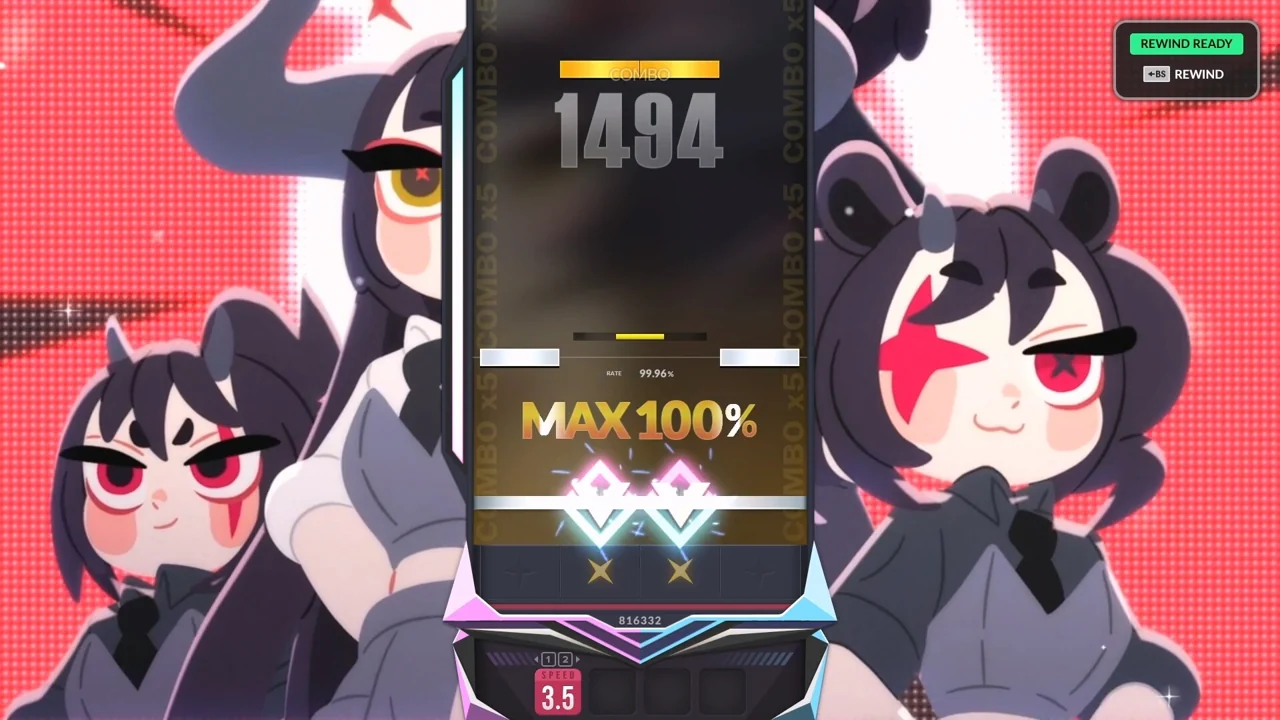
DJMAX RESPECT V · Official PC screenshot
A game screenshot showing the hit line, notes and timing ratings. The calculations and measurement records below examine audio output timing and input error separately.
Image credit: NEOWIZ / Steam · Source page ↗ · Original image ↗
Map output-frame times between clocks
In getOutputTimestamp(), contextTime is the audio time of a sample frame being rendered by the output device, while performanceTime estimates when that frame was output on the performance timeline. The pair links two different time coordinates.
For a returned pair (C₀,P₀), a nearby audio time T maps to an estimated performance time of P₀+1000(T−C₀) ms. This maps audio output frames between clocks. Finger contact, input-device delivery and the moment a person hears sound each need their own measurement procedure and record.
Related primary sources: MDN · getOutputTimestamp() ↗
Reset the playback reference after stopping a source
Consider stopping an individual source at file position 16 seconds while the context continues. Even as C advances from 10 to 13 seconds, the game retains file position 16 seconds. Scheduling a new source at file offset 16 seconds when C=13 seconds resets E and O to 13 and 16; at C=14 seconds, file position is 17 seconds.
Suspending the entire context is a separate state that also requires checking how its clock advances. Document the interruption policy, saved file position, new source and responsibility for cleaning up scheduled tasks. On return, check that music and notes resume from the same state.
The saved file position stays still while the context advances
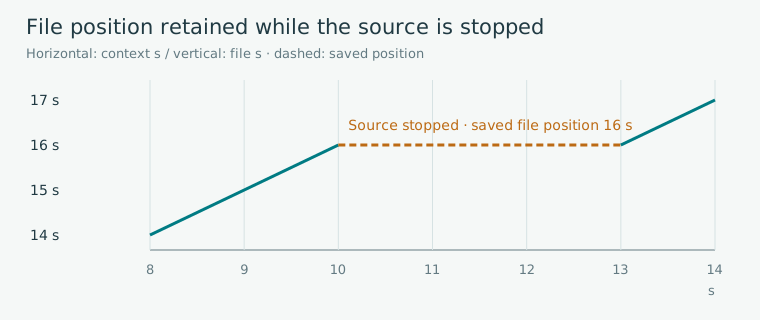
Editorial diagram · A hypothetical source-only stop: file position 16 seconds is retained while context time runs from 10 to 13 seconds, then playback resumes from a new reference.
Horizontal axis: context time (seconds). Vertical axis: music-file position (seconds).
On smaller screens, scroll the diagram horizontally. Enlarge diagram ↗
Values and sequence shown in the diagram
- With E8/O14, file position is 16 at C10
- Source stopped during C10–13: saved position 16
- With new E13/O16, file position is 17 at C14
Distinguish initial playback from the loop interval
Starting at buffer time 0 with loopStart=4 seconds and loopEnd=12 seconds first plays to 12 seconds, then returns to 4 seconds. For uninterrupted elapsed time u at rate 1, once u is at least 12 seconds, position is 4+((u−12) mod 8) seconds. At u=13 seconds, position is 5 seconds.
This calculation distinguishes the introduction before the loop from the repeating 8 seconds. Record a new segment reference when starting offsets, rate changes or stop/resume operations are involved. Keep loop period, display frequency and judgment tolerance as separate settings.
Related primary sources: W3C · AudioBufferSourceNode Looping ↗
Separate a consistent timing offset from variation
Align target and input timestamps before collecting timing errors. Even with the same audio output, anticipation, visual and audio cues, devices and processing load can all affect the results. Record conditions and individual events alongside the values before attributing them to a particular cause.
The median locates the center of the results; the range and individual points show how much they vary. A fixed correction shifts every point by the same amount. Check units, origins and loop calculations automatically, then test perceived sound and tapping on each target device.
Questions different records can answer
| Source | Quantity examined | Conditions to record |
|---|---|---|
| File-position calculation | Playback position within the buffer | E, O, rate, interruptions and loops |
| Output timestamp | Correspondence between output frames and program time | API return pair, units and observation time |
| Repeated tapping | Input errors combining human and device effects | Cues, device, output, trial and correction value |
| Physical latency measurement | Interval between two defined physical events | Sensors, devices and measurement definitions |
Sources & scope
Sources reviewed 2026.10.17: time-origin definitions, getOutputTimestamp return values and usage example, and Web Audio looping behavior. The three-clock values and stop, resume and loop calculations are editorial hypothetical models. Output-time estimates, human input errors and physical latency measurements are maintained as separate records.